


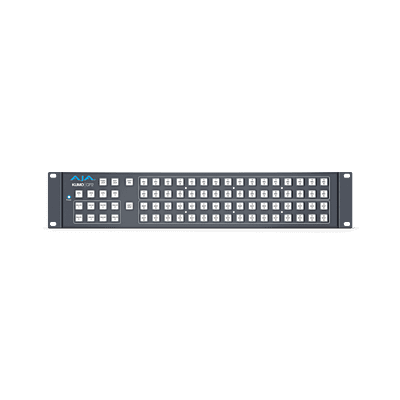
KUMO CP2
AJA Ki Pro Ultra 12G DCI/UHD/HD Recorder and Player (SDI, HDMI)
Detalles del producto
Overview
KUMO CP2 is a 2RU control panel that can be used in standalone or networked configurations suitable for all KUMO routers including the KUMO 6464. Connecting via Ethernet to the same network as KUMO routers, KUMO CP2 enables full control from any location without the need for a computer. Up to four KUMO routers can be controlled from a single control panel. Supports ganged dual and quad port routing control, allowing users to group together multiple inputs and outputs for Dual Link, Quad Link 4K/UltraHD, and 8K/UltraHD2 workflows.
Features
2RU Control Panel for KUMO SDI Routers
Small, portable form factor
Control up to 4x KUMOs per control panel
Supports ganged dual and quad port routing control
Eight salvo buttons per router
Redundant power supply (option)
Embedded web server for remote control
Configure IP Address via USB port and supplied AJA eMini-Setup software for PC/Mac
Five year warranty
Buttoned Up
The destination-oriented KUMO CP2 Control Panel offers plug-and-play control of AJA’s complete line of compact KUMO SDI routers.
KUMO CP2 features 80 buttons and enables selection of up to 64 sources and 64 destinations on each of up to four KUMO routers in standalone mode or through a built-in GUI accessible from any web browser on the network.
This affordable control panel is only 1.3 inches deep, easy to install, eliminates the need to use a Shift key on KUMO 1616 and 3232, and is backed by a five-year warranty.
KUMO Presets
This powerful feature saves current settings to 1 of 20 available Preset slots. Settings on the Configuration page are stored in the preset and any preset may be recalled at any time, returning the KUMO to the previously stored state. Items stored as part of a preset are:
1. Switching Mode
2. Crosspoint map
3. Source Button Settings: name, color, hidden/shown etc.
4. Destination Button Settings: name, color, hidden/shown etc.
5. Salvo configurations
Also included is the capability to deploy presets from one KUMO product to another. For example, the KUMO 6464-12G names can be deployed on a KUMO CP2 control panel UI configuration via the router preset.
Salvos for Simple Source to Destination Mapping
Salvos allow an operator to quickly route a predefined set of crosspoints, connecting specific sources to destinations, at the push of a button. Salvos are easily created by simply setting up the desired routes and saving it to a button in the KUMO router’s Web UI.
Up to eight salvos can be stored in a KUMO router and can be instantly recalled via the KUMO router’s Web UI, GVG Native Protocol over Ethernet, RS-422, and/or the AJA KUMO CP2 Salvo buttons.
Remote Router Control
While KUMO routers can be controlled via the built-in web UI, connecting a KUMO CP2 to the network provides a familiar, computer-free solution for router control for all KUMO routers.
KUMO CP2's front panel interface is easily recognized and understood by video engineers, tape operators and editors and provides a fast, tactile interface that can stand up to the rigors of daily use.
Redundant Power Supplies
Routing sits at the heart of your signal matrix needs, connecting one critical device to another. To ensure maximum uptime in the unlikely event of a power supply failure, KUMO offers redundant power supply options that can failover with zero disruption to operations.
Multi-Router Configuration
Utilizing its Ethernet network connection, KUMO control panels can communicate with up to four KUMO routers anywhere on the network. This allows you to locate control panels exactly where they are needed for maximum accessibility.
Simple Installation and Configuration
For standalone configurations with KUMO control panels, all KUMO routers can be connected together directly using standard RJ45 cables or a network switch, if required. KUMO software will automatically detect and assign routers to control panel delegations so your routing system is ready for use immediately.
In a network environment, the built-in web UI provides all the setup controls to create exactly the configuration you require.

